


Thesis and Dissertation Services: Thesis and Dissertation Formatting Guide
INTRODUCTION
Welcome! This guide is intended as a resource to help you in preparing a thesis or dissertation (both proposal and final) that meets the formatting requirements of the Graduate School. It provides the uniform standards of formatting you are expected to maintain when writing your document at both proposal and final stages. The purpose of the TDS review is to produce theses and dissertations that maintain a professional and consistent appearance. We want to produce documents of which both the university and you can be proud.
When you submit your proposal document or final document, TDS reviews it for adherence to the formatting requirements set forth in the applicable thesis/dissertation template and as further described in this guide. This means that TDS does not review for spelling, grammar. Although TDS broadly reviews documents for adherence to the applicable style guide, it is up to you to work closely with your advisor and/or committee members to ensure your document meets all style requirements, follows the rules of English grammar, and does not violate any copyright laws.
Whenever there are differences in format and layout between the Thesis and Dissertation Formatting Guide and your chosen style guide, the Graduate School formatting guidelines overrule.
Everyone in the Graduate School is working to ensure the success of our graduate students. We encourage you to ask questions or let us know of any concerns; we are here to help. If there are any questions or concerns not answered in this guide, please feel free to contact the TDS office at (903) 886-5968 or through email, [email protected]. You can also make an appointment for an office visit or Zoom meeting, if needed.
Resources
TDS maintains separate web pages for thesis students and doctoral students. The short link to the TDS/Thesis web page is www.etamu.edu/thesis, and to the TDS/Dissertation short link is www.etamu.edu/dissertation. TDS provides a wealth of information and resources to assist you in completing your thesis or dissertation. It is recommended you bookmark the appropriate short link for convenient reference.
See the left sidebar of the TDS web pages for the following resources:
TDS maintains separate web pages for thesis students and doctoral students. The short link to the TDS/Thesis web page is www.etamu.edu/thesis, and to the TDS/Dissertation short link is www.etamu.edu/dissertation. TDS provides a wealth of information and resources to assist you in completing your thesis or dissertation. It is recommended you bookmark the appropriate short link for convenient reference.
See the left sidebar of the TDS web pages for the following resources:
- iThenticate: The university has contracted with this service in order to determine the degree of similarity between the document you have drafted and other copyrighted material. The system produces a similarity percentage indicating the degree to which your document “borrows” from other published material. The Graduate School has a cap of 12% similarity. All submissions must include a copy of this similarity report. The iThenticate program requires licensing and most faculty should already have access to this program; however, if access is needed, faculty should contact the Office of Academic Technology ([email protected]); she can provide faculty with information for licensing to obtain access. Because students are not allowed to obtain a license to access iThenticate, please contact your advisor for a copy of the report. More information on how to prepare a student’s document for the iThenticate process and on how to read the report can be found on the iThenticate web page.
- Resources for Writing: This item provides a number of resources to aid in the drafting of your proposal and final document. Below is a brief description of the resources made available to you.
- Graduate School Templates: The Graduate School provides the following templates depending on what your department requires:
- Standard template used by both thesis and dissertation students unless the applicable department requires a different template.
- LaTeX template, used by thesis students in the sciences, such as physics and computer science.
- Biology template, which is used by biology thesis students.
- Graduate School Guides: The Graduate School/TDS provides detailed guides to assist you when drafting your document and then when submitting your document for review.
- The Thesis and Dissertation Formatting Guide provides more detailed information and instructions for setting up your document and for formatting it. There are also two appendices to this document with Appendix A providing an example of a vita, and Appendix B providing examples of the formatting of tables and figures.
- The Thesis and Dissertation Submission Guide provides detailed instructions on the submission process, both at the proposal stage and at the final stage.
- Commonly Used Style Guides: Each department and/or your advisor determines what style guide you should follow when drafting your document. In this section, TDS provides links to the most commonly used style guides and helpful resources to various styles that can assist when drafting your document. Remember, however, if the style guide conflicts with a Graduate School formatting requirement, the Graduate School formatting requirement prevails.
- Graduate School Research Librarian: The Graduate School provides students access to a university librarian who is available to provide specialized one-on-one research assistance tailored to your advanced academic needs. Fatemeh (Mahta) Kholoosi Raftar, Research and Instruction Librarian, can help with the following topics:
- Resource Exploration: Learn about the university library’s collections and databases using advanced search techniques to locate the most pertinent scholarly materials for your topic.Database Mastery: How to navigate complex databases effectively, ensuring you are accessing the most current and relevant research available.Citation Management: Understand and master citation styles such as APA, MLA, or Chicago by utilizing citation management tools to effortlessly organize your references.Research Organization: How to organize your research materials and data, making it easier for you to manage and reference as you write.
- Writing Resources: This section provides links to sites that can help with grammar, Word formatting, and formatting Word on a Mac.
- Graduate School Templates: The Graduate School provides the following templates depending on what your department requires:
- Deadlines for Thesis and Dissertation Submissions: All the important dates and deadlines associated with the thesis and dissertation process can be found on this page. Be sure to add these dates to your calendar.
- Frequently Asked Questions: If you have a question about the thesis or dissertation process or what to submit, take a moment to review the FAQs.
Now you are ready to begin drafting your document!
FORMATTING OF PROPOSAL AND FINAL DOCUMENT
Thesis and Dissertation Services (TDS) is entrusted by the Graduate School with the task of reviewing all proposal documents, final theses, and final dissertations to ensure that each document meets the formatting standards set by the Graduate School.
Page Setup
The text of the document must be in a standard font, either Times New Roman or Arial. Font size can be in a range from 12 point to as small as 10 point font, but must be a consistent size throughout the document. The body of the text is double-spaced unless indicated otherwise in the template or the Formatting Guide. The right margin should be jagged (left justification), not fully justified. Major headings are formatted and positioned according to the Graduate School template and guidelines with subheadings formatted and positioned according to the style guide being followed.
The margins for each page are 1 inch for the top, bottom, left, and right margins, except the first page of the Abstract page, which has a top margin of 2.5 inches. All material (text, tables, figures, appendices, etc.) must be fit within the margins, with the exception of the page numbers, which are placed in the header.
Page Numbering
Every page in the document except the Title Page and the Signature Page (the first two preliminary pages) must be numbered. The Title and Signature Pages are considered pages i and ii, but no page number is shown on these two pages.
Page Numbers
Page numbers are placed in the header in the upper right corner of the page, ½ inch from the top edge of the page and 1 inch from the right edge of the page. Preliminary pages are numbered with lowercase Roman numerals and the body of the manuscript numbered using Arabic numerals, with Chapter 1 beginning with page 1.
Preliminary Pages
Below is a list of the preliminary pages in order:
- Title page (no page number)
- Signature page (no page number)
- Copyright page (if copyrighting, this will be the first page with a page number—Roman numeral iii in the top right corner)
- Abstract (if not copyrighting, this will be the first page with a page number—Roman numeral iii in top right corner, otherwise it will be page iv)
- Acknowledgments
- Table of Contents
- List of Tables (as applicable)
- List of Figures (as applicable)
Body of the Manuscript
The body includes the following:
- Body (all chapters)
- References
- Appendices (if applicable)
- Vita
Arrangement
The document should be arranged in the following order:
- Title Page
- Signature Page
- Copyright Page (if not copyrighting, do not include this page)
- Abstract
- Acknowledgments (optional)
- Table of Contents
- List of Tables (if applicable)
- List of Figures (if applicable)
- Body of document
- References
- Appendices (if applicable)
- Vita
The first entry in the Table of Contents should be the first item following the Table of Contents (i.e., the List of Tables and/or the List of Figures, as applicable). You may choose to include the Abstract and Acknowledgements in the Table of Contents, but this is not required.
Footnotes
Footnotes must be single-spaced with a single space between footnotes.
Major Headings
The rules for major headings are as follows:
- Center major headings at the top of a new page; put in ALL CAPITAL letters. They should be flush with the top margin making them no more than one inch from the top of the page. The only exception to this requirement is the heading on the first page of the Abstract page.
- If major headings are more than one line, double-space the lines. Each subsequent line of the heading must be shorter than the one above it.
- The font must be the same size as the body text, no larger.
- Do not bold major headings or put the headings in italics (except for scientific terms in Latin or titles of books).
- Do not include punctuation after a major heading.
- Format major headings consistently.
The following are considered “major headings” in the document:
- TITLE of the thesis or dissertation on the Title Page
- TITLE of the thesis or dissertation on the Signature Page
- Headings of other preliminary pages, ABSTRACT, ACKNOWLEDGMENTS, TABLE OF CONTENTS, LIST OF FIGURES, LIST OF TABLES
- CHAPTER titles
- REFERENCES (or LITERATURE CITED, etc.)
- APPENDICES cover page and each APPENDIX title page
- VITA
Subheadings
Subheadings are used to organize chapters into different sections. Some style guides, such as APA, provide specific rules for subheadings. Become familiar with your style guide rules regarding capitalization, positioning, and formatting of subheadings. Be sure to follow logical subordination of subheadings. According to the rules of subordination, you must have a level 1 subheading before you can have a level 2 subheading.
If your style guide does not provide specific instructions on formatting subheadings, please follow these guidelines:
- Use the same font size for all subheadings.
- Use consistent capitalization for each level of subheading, but do not use all capital letters, as this defines major headings.
- The style used for subheadings must clearly show the various subordination levels and must be used consistently throughout the document from chapter to chapter.
- Continue double-spacing before and after subheadings; do not include extra spacing.
- Do not begin subheadings and subsections on a new page.
- A subheading near the bottom of a page must have at least two lines of text under it or the subheading should be moved to the next page to remain with the related text.
Figures and Tables
If your chosen style guide provides formatting and style requirements for tables and/or figures, follow those requirements except where they contradict with the Graduate School formatting and style requirements. The Graduate School formatting and style requirements are addressed below as follows.
Color, Size, and Legibility
- Color is acceptable in figures, but black and white is preferred.
- Color is not acceptable in tables.
- The font size for the contents of a table may be reduced in order to fit on a page, but the font size should not be any smaller than 7-point font.
- The body of a table must be double-spaced.
- All lettering must be of publishable quality; this requirement includes scanned images. Images must be clear and without blurred or dark areas.
- All figures and tables must fit within the 1-inch margins of the document.
Text Mention
Each table and figure must be mentioned (referred to as an “in-text reference”) in order of appearance. This in-text reference must appear within 1½ pages before the table or figure appears in the document. Tables and figures that appear in an appendix should be mentioned in text, but they do not need to be listed in Lists unless they are numbered consecutively after text figures and tables within the body of the document.
Placement in Text
Tables and figures may be included on a page with text or, if your style guide requires, on separate pages. However, if possible, do not leave more than ½ a page of white space on a page before a table of figure. If a table or figure is placed on a page with other material, the table or figure should be separated from the text (or other material) by at least 3 single spaces above and below the figure or table.
Long and Continued Tables
When tables are longer than one page, include the table number at the top of subsequent pages with the word “(continued)” in parentheses following it. Do not include the table title. Also, include the necessary column headings from the table for ease of reading. Include the bottom line of the completed table only on the last page of the table. See the examples included in Appendix B to this document.
Long and Continued Figures
When several figures make up an entire figure and they span more than one page, include the figure number at the top of subsequent pages with the word “(continued)” following it. Do not include the figure title/caption. See the examples in appendix B to this document.
Landscape Orientation
If the table or figure is placed sideways on a page (landscape position), the top of the table or figure must be at the left-hand, “binding” side, of the page. The page number stays in the regular (portrait) position. Follow this link for instructions for correct placement of the page number or use the template provided as an Appendix to the thesis/dissertation template for placement of the page number.
Basic Format of Tables
All tables should reflect the following basic format no matter the style guide being followed (see Appendix B for an example table):
- Do not use vertical border lines.
- Use minimal horizontal border lines. The minimum border lines to include are a top border line, a line below the top header row, and a border line at the bottom of the table.
- Double-space the contents of the table.
- Each column should have a column heading, not bolded.
- Columns of text should be left aligned. Note that rows of text with more than one line may be single-spaced, but double-space between the rows.
- Align columns of numbers by the decimal, by the one's column, or, if the column contains both, first by the decimal, then by the one's column.
- Unless your style guide instructs otherwise, align tables with the left margin.
Table Titles and Numbering
Each table must have a unique title (no two titles can be the same). Unless your chosen style guide instructs otherwise, the table title must appear above the table and be consecutively numbered throughout the text. The style guide you are following may dictate the style of the table numbering, but no matter the style followed, numbering should be consecutive (1, 2, 3) or by chapter and section (1.1, 1.2, 2.1, 2.2, etc.).
Basic Format of Figures
All figures should reflect the following basic format no matter the style guide being followed (see Appendix B for an example figure):
- Do not include a title as part of the figure; that is what the figure title/caption is for.
- Delete any outside border lines.
- Unless your style guide instructs otherwise, align figures to the left margin.
- Figure captions (appearing below the figure) may be either double-spaced or single-spaced, but do so consistently for all figure captions.
Figure Captions/Titles and Numbering
Each figure must have a unique caption/title (no two captions/titles can be the same). Your chosen style guide may require a figure caption to appear below the figure (called a caption) or a figure title to appear above the figure. If it does not specify, you may place it in either location, but do so consistently throughout the document (always below or always above). No matter the style guide followed, figures should be numbered consecutively (1, 2, 3) or by chapter and section (1.1, 1.2, 2.1, 2.2, etc.).
Labeling of Parts or Panels of a Figure:
If there is more than one part or panel to a figure, begin the figure caption or title with a general descriptive sentence or phrase and then identify each individual part of the figure with a letter or number before the description.
Large Figure Title/Long Caption on a Separate Page
This format is used only for figures when there is not enough space for the caption/title on the page with the figure, even if the figure size is reduced. If the caption/title must go on a separate page, place it on the page preceding the figure. In the List of Figures, the number of the page on which the figure itself appears is the page number listed. This format is never used with tables.
The Appendices
Appendix figures and/or tables must be mentioned in text. Figures and/or tables in appendices may be numbered consecutively following the numbering of the figures and/or tables found in the body of the document using an Appendix designation (A-1, A-2, for example), or they may be unnumbered. If numbered consecutively with the figures and/or tables in the text, they must be included in the List of Tables and/or List of Figures. Graduate School formatting and style requirements must be maintained for figures and/or tables in appendices.
Lists of Figures and Tables
Entries in the Lists of Figures and Tables must agree word-for-word with the title or caption in the text. For captions, include the entire caption up to the first period (parenthetical information may be excluded from the List). Be sure the figures and tables are found on the page given in the List.
Equations
Equation numbering is optional and may be consecutive (1, 2, 3) or consecutive by chapter or section (1.1, 1.2, 2.1). No two equations may have the same number unless identical, term-for-term. The font size and style of the equation and its number must match the text.
References/Literature Cited
Each document must contain a formal reference section. References must follow the format required by the chosen style manual; however, the Graduate School requires that the list should be double-spaced with no extra spacing between the reference entries.
Citations should be crosschecked with the reference list to verify that every citation has a source listed and that every source has a citation. In other words, each citation must have a corresponding reference entry, and each reference entry must have a corresponding citation.
When using electronic sources, before submission of the document, please check that all URLs or DOI numbers provided are still active and correct. URLs or DOI numbers that are broken or inactive should be replaced with working links. If a working URL or DOI number cannot be found for the source, an alternative source must be found or the source should be removed from the paper. The “login.proxy” URLs do not serve the reader because they have restricted access and a reader can only access the material from that URL if the reader has been given access or is a currently enrolled student, staff member, or faculty member, since most proxy URLs are university URLs. If you are unable to find this source through another URL or DOI number and the reference is complete without it, do not include it with the reference.
In-Text Mention of References (Citations)
As noted above, all references must be cited in the text, and all text citations must be referenced. All text citations must be from sources actually used and must be from appropriate sources. In most cases, Wikipedia, About.com, lifestyle magazines (e.g., People, Us Weekly, OK!, etc.), and other non-peer-reviewed sources are not appropriate. Using inappropriate sources diminishes the rigor of your document and, in some cases, can lead to misinformation.
Appendices
Appendices are optional and used for supplementary material. An Appendices cover page is required if there are two or more appendices. Each appendix must have a title page. Place the appendices after the reference section and before the vita. All appendix pages have page numbers continuing from the last page of the references. All appendix material must be within prescribed margins and be readable in size and legibility.
Appendices Cover Page
A cover page should precede the appendices. The title, APPENDICES, appears in all capital letters in the middle of the page, centered vertically and horizontally.
If you have only one appendix, the Appendices cover page is replaced with the Appendix title page (see below) with no letter designation needed.
Appendix Title Pages
Each appendix requires a title page with an appendix designation (APPENDIX A, for example). The appendix title appears one double space below the appendix designation. The appendix designation and title are in all capital letters and centered vertically and horizontally on the page. Titles with more than one line in length must be double-spaced with each subsequent line being shorter than the line above it.
If there is only one appendix, the appendix title page will serve as the cover page also. Include only the word APPENDIX with no letter designation, and the appendix title is one double space below the heading. The appendix designation and title are in all capital letters and centered vertically and horizontally on the page.
Vita
The vita page is required and cannot be more than one page. For the purposes of the vita, your information should be in paragraph form instead of the traditional resume format. A sample vita can be found in Appendix A to this guide.
FORMAT INSTRUCTIONS AND SAMPLES
Title Page
General Format
- Font size and style should be consistent and must match the text of the document.
- Do not bold text on this page.
- Do not number this page.
- Use proper spacing and capitalization as shown on the sample page and in the template.
Title of Document
- The first line of the title is placed one inch from the top of the page, flush with the top margin.
- Use all capital letters and center the text horizontally.
- Double-space the lines of the title if it is more than one line.
- If the title is more than one line, subsequent lines must be shorter than the line(s) above it.
- Do not include a period at the end of the title.
Author Statement
- Double space and center the statement both vertically and horizontally on the page.
- Capitalize the A and the T in Thesis or the D in Dissertation, i.e. “A Dissertation.”
- Student’s name is in all capital letters; your name must be the same as in the official records of the university.
Submittal Statement
- Single space text.
- “of East Texas A&M University” is on a line by itself with no space before or after the hyphen.
- Your degree is in all capital letters; use the full name of the degree without major (e.g., MASTER OF SCIENCE, MASTER OF ARTS, DOCTOR OF PHILOSOPHY, DOCTOR OF EDUCATION). Check the Graduate Catalog for correct wording of your degree.
Date
- Use the month and year you expect to graduate. Graduation months at East Texas A&M University are May, August, or December—do not use the final defense or submittal month.
- Do not use a comma between the month and year.
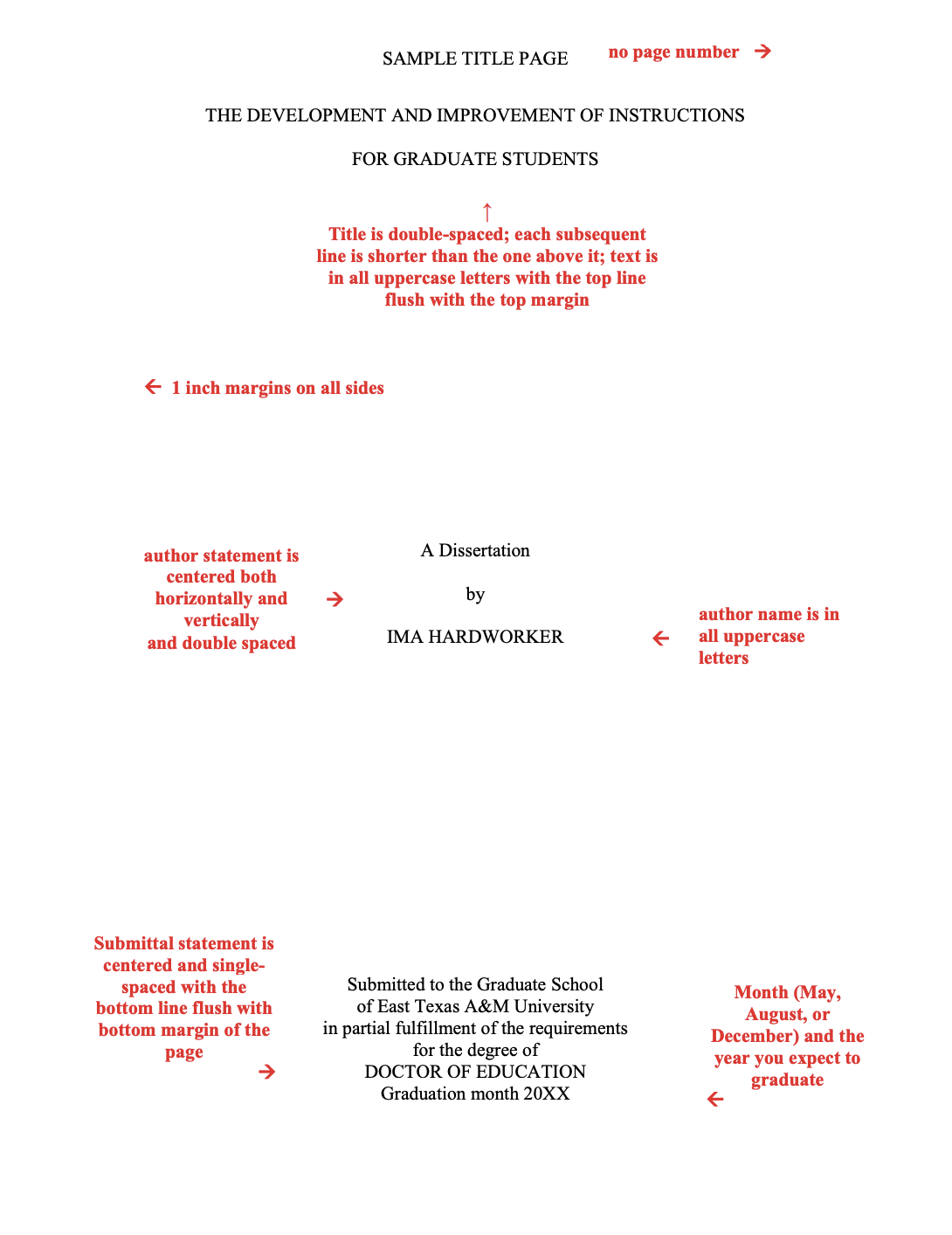
Signature Page
General Format
- Font style and size should remain consistent with that used for the Title Page.
- Do not bold text on this page.
- Do not include a page number on this page.
- Use proper spacing and capitalization as shown on the sample page.
Title of Document
- Title should be flush with the top margin.
- Use the same wording for your title as on the Title Page.
- Use all capital letters and center.
- Double space if more than one line; no period at the end of the title.
- Succeeding lines of title must be shorter than the preceding lines. Use the same line breaks as used on the Title Page.
Author Statement
- Capitalize the A and the T in Thesis or D in Dissertation, i.e. “A Dissertation.”
- Double space text and center the statement both vertically and horizontally on the page.
- Student's name is in all capital letters, using the same name used on the Title Page.
Committee Member and Administrator Names
- Do not include degree designations when listing names (e.g., Dr., PhD, etc.).
- If a committee member, chair, or co-chair is also a department head or dean, include his or her name for both positions.
- Do not repeat the chair's name in the list of committee members.
- Use the correct spacing shown on the sample page.
- Verify (with department and/or college) the correct spelling and presentation of all names.
Copyright Page
Although copyrighting is optional, it is recommended you consult with your advisor before choosing not to copyright. Also, please be sure to review the section in this guide entitled Publication of the Research: Copyright Issues. If copyrighting your thesis or dissertation, please follow the formatting guidelines detailed below and shown on the following sample page. If you choose not to copyright, please do not include the copyright page in your final document. If you are not copyrighting, the Abstract will be page iii of your document.
Page Number
- This is the first page on which a page number appears.
- The page number iii is placed in the top right corner within the header.
- The page number is ½ inch from the top of the page and 1 inch from the right side of the page.
Copyright Statement
- The statement is centered both vertically and horizontally on the page.
- Double space between the copyright statement and your name.
- The year used in the copyright statement should be the year you expect to graduate.
- Your name should appear as it does on the title page and signature page, only the name should be in uppercase and lowercase letters.
Abstract
The abstract page should be included in both the proposal document and the final document; however, it does not need to be a complete abstract at the proposal stage. At the proposal stage, please include a brief summary of the purpose of your thesis/dissertation and the procedures used to research/investigate the topic. At the final stage, the completed abstract should be a summary of the processes and statistical procedures used in the findings. NOTE: This is the only page with a different margin setting.
Preliminary Lines
- The heading ABSTRACT appears 2 ½ inches from the top of the page; this is the only page that will not have a 1 inch top margin. Instead of changing the margin setting on this page, you may also use the left ruler bar, aligning the heading with 1.5 on the left ruler bar.
- The page number in the top right corner should be iv unless you are not copyrighting your document. If you are not copyrighting, the page number should be iii.
- The thesis or dissertation title is centered and single-spaced on this page with the title in all uppercase letters. The title should match exactly the title found on the first two pages, and the line breaks should be the same.
- Your name is centered and in the same form as it appears on previous pages, but in upper and lower case letters.
- Insert a comma after your name and include the abbreviation of the degree you are earning, e.g., MS, MA, EdD, PhD (no periods).
- In the university name, do not put spaces between A&M.
- After the university name, insert a comma and include the year in which you expect to graduate (the same year given on the previous pages).
- Include your advisor's degree abbreviation after his or her name (e.g., PhD, EdD), no periods.
Text
- Text begins two double spaces below the advisor's name.
- Text is double-spaced.
- Text is aligned to the left margin; do not use full justification.
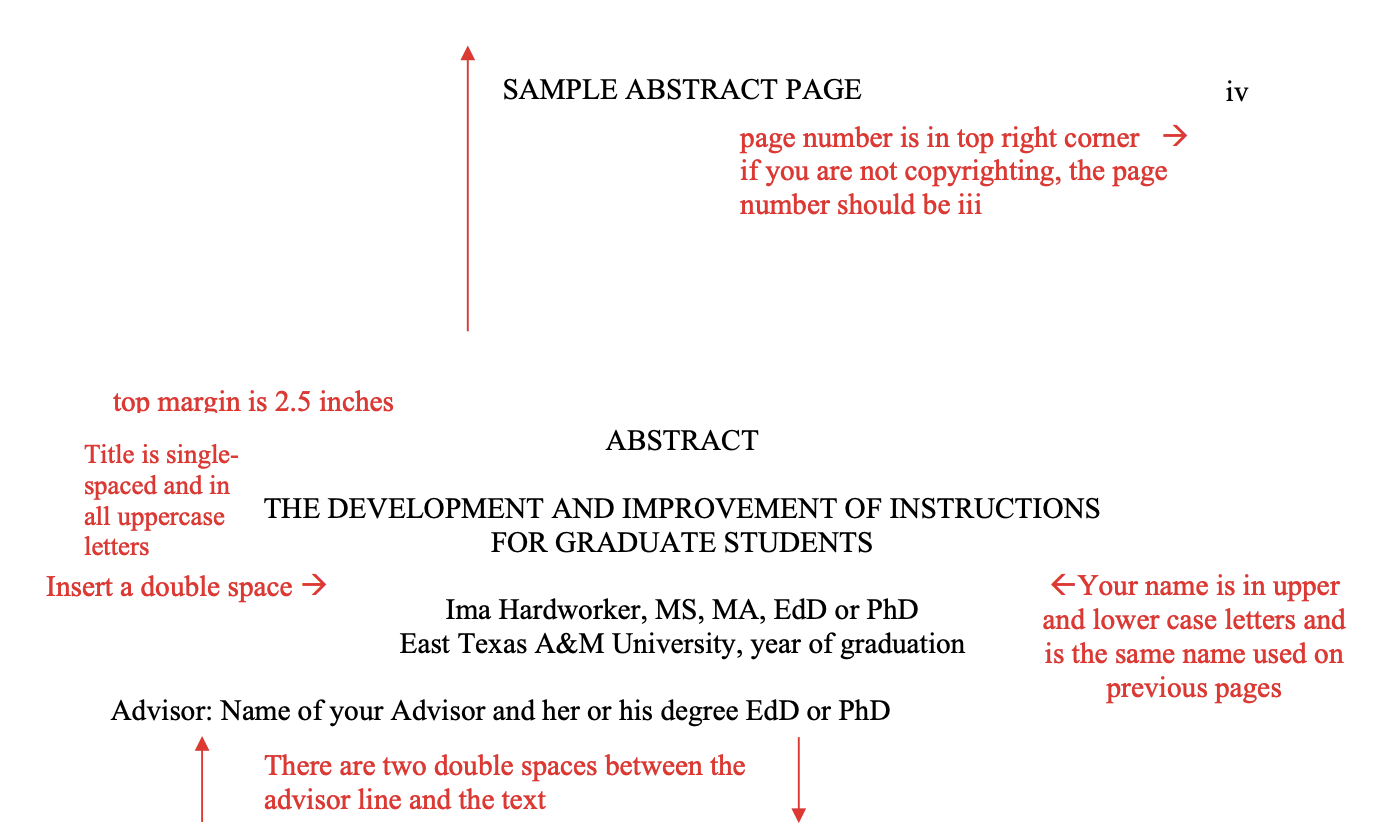
The text of the Abstract starts two double spaces below the advisor's name. The text of the abstract is double-spaced. Follow the same margin settings as your narrative text. Do not use full justification of text.
Your Abstract must be a complete snapshot of your manuscript. The first paragraph briefly describes the focus of your study and the methods you used to examine or test your hypothesis. The remaining paragraphs present the research and results in detail. However, text of the abstract should not exceed 350 words. Any term (or numeral) with a space on either side is counted as a one word. Keywords: Keywords are optional, but if you decide to include them, please start the keywords on a new line and italicize the word “Keywords.”
Table of Contents
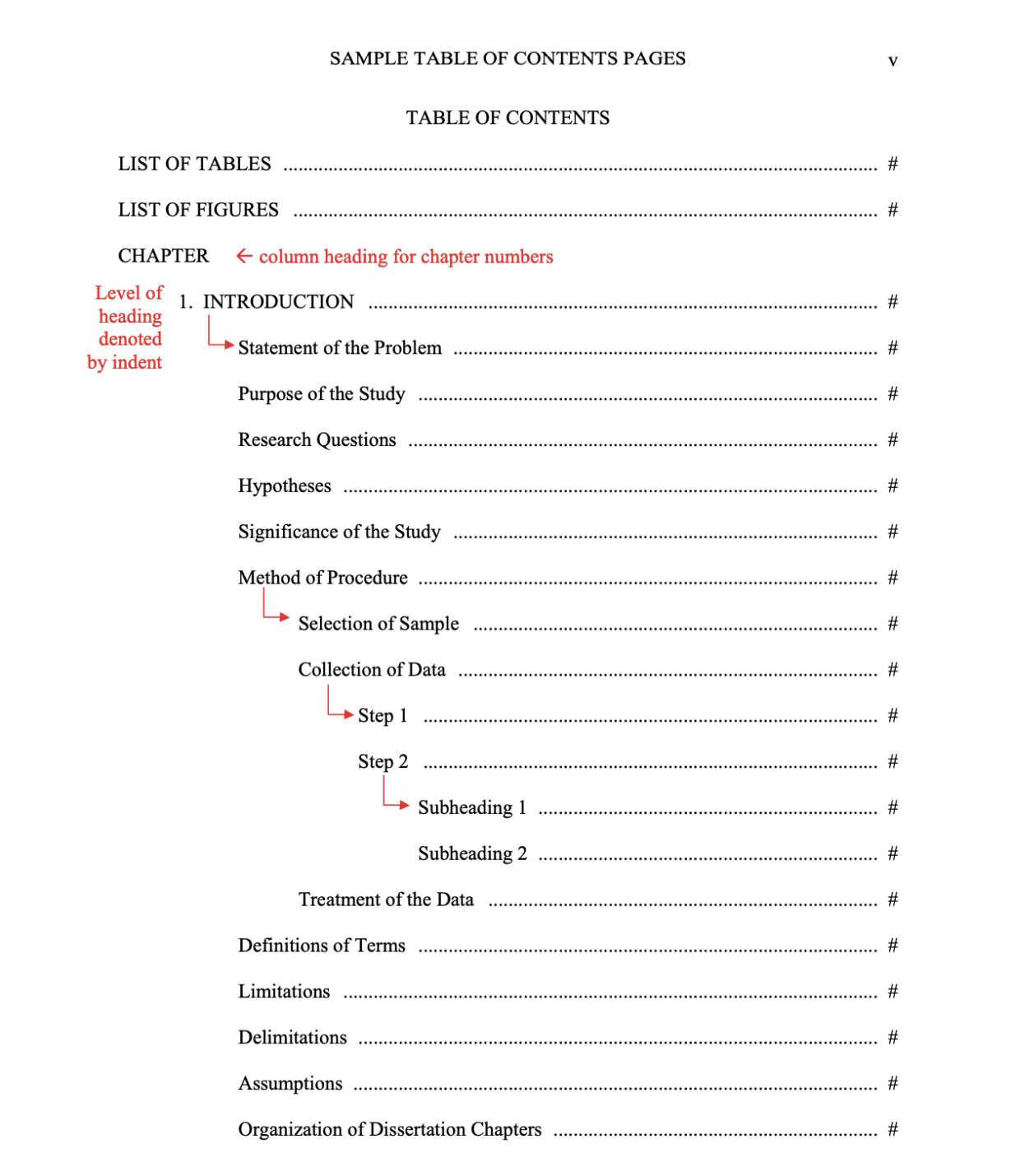
The Table of Contents (TOC) should follow the formatting of the sample shown on the next page. Generally, your document should be a 5-chapter model, unless your department recommends a different number of chapters. Some disciplines may not “fit” in the standard 5-chapter model or an advisor may prefer a different organization of the information presented in the document. As long as the basic topics of introduction, literature review, methods, findings, and conclusions are addressed logically in the document, then variation of the 5-chapter model will be accepted. However, formatting of major headings as shown in the sample must still be maintained. With this said, you are not obligated to use the chapter titles shown in the sample.
At the proposal stage, because the page numbers will likely change between the proposal and final dissertation, you are not required to report page numbers for each section. However, you do need to include the dot leader lines. To create the dot leader lines, go to the Home tab on the Word document tool bar. Open the dialog box for Paragraph. At the bottom is a box for Tabs. Click this box to open up the Tabs dialog box. In the Tab stop position, insert 6.5; in the Alignment section, select Right; in the Leader section, select 2; click Set; and then click Okay.
General Format
- Do not bold text on this page.
- Do not use italics on this page (except for Latin terms, titles of works, etc.).
- Insert dot leader lines between TOC headings and the page numbers.
- Insert a uniform number of spaces before and after the dot leader lines. For example, in the sample on the next page, two spaces are placed before and after each dot leader line.
- Double-space between headings.
- When major headings span more than one line, double-space the lines.
- When subheadings span more than one line, you may single-space the lines.
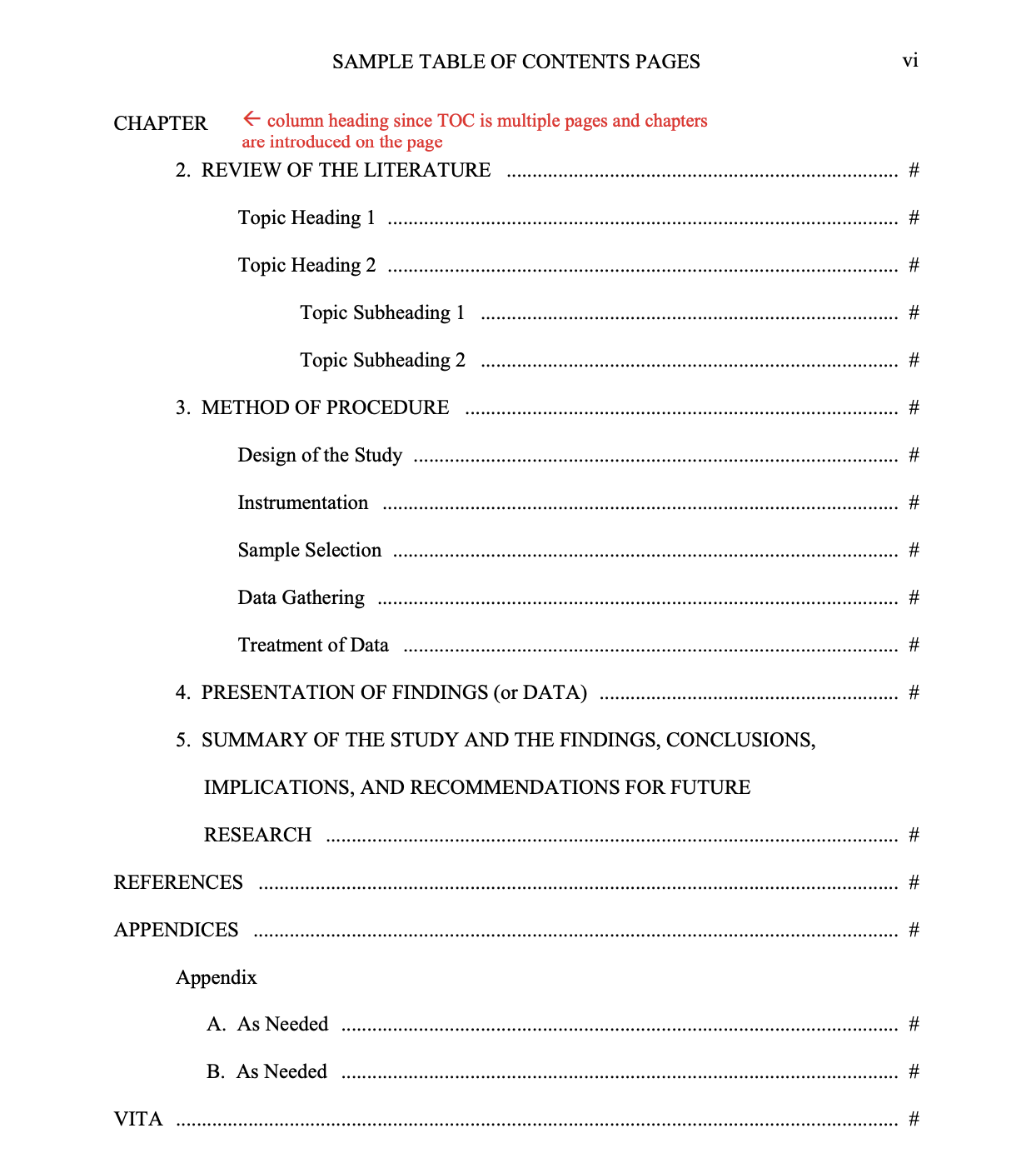
- If your TOC is more than one page, on each page that introduces a new chapter, include the word CHAPTER in the upper left corner of the page as a column heading (see sample page).
Content
- The TOC must contain the major headings and the first level of subheadings.
- Each level of subordination of subheadings should be indicated by an additional .5-inch indention.
- Inclusion of lower levels of subheadings is optional, but if included, must be included consistently for all chapters and sections.
- Place major headings in all capital letters.
- Use title case for subheadings (upper and lower case). In title case, major words are capitalized, and most minor words are lowercase.
- major words: Nouns, verbs (including linking verbs), adjectives, adverbs, and pronouns are considered major words.
- minor words: Short (i.e., three letters or fewer) conjunctions, short prepositions, and all articles are considered minor words.
- In sentence case, most major and minor words are lowercase (proper nouns are an exception in that they are always capitalized).
- Preliminary pages do not have to be included in the TOC; however, if included, begin with the Abstract page, and include all the preliminary pages that follow
- Chapters should be numbered using Arabic numbers with a period following the number.
- If there is only one appendix, change APPENDICES to APPENDIX (with no letter designation) and list the appendix document title using title capitalization one double space below, indented .5 inches. Page number follows the appendix title and reflects the page of the APPENDIX cover page.
Consistency
- Check that levels of subordination of headings and subheadings in the TOC match the level of subordination in the document.
- Check for consistency of capitalization.
- Headings and subheadings in the TOC should match word-for-word with the headings and subheadings in the text.
- Check that the titles of the listed appendices match exactly the headings used for the appendices in the document.
- Check the TOC against the body of the paper for agreement of page numbers.
List of Tables and List of Figures
General Format
- A List of Tables and/or a List of Figures should be included if you have two or more tables and/or figures in the main body of text.
- If used, a separate list for tables and a separate list for figures are needed and either list may come first.
- The heading (LIST OF TABLES, LIST OF FIGURES) is in all capital letters, centered, and flush with the top margin.
- One double-space below the heading, include the word “FIGURE” or “TABLE” flush with the left margin above the list of figures or tables.
- Number figures or tables as they are numbered in the document.
- Insert a uniform number of spaces before and after the dot leader line. In the example on the next page, two spaces are placed before and after the dot leader line.
- All figure and/or table entries are double-spaced.
- If a list is more than one page, on each subsequent page insert the word “TABLE” or “FIGURE” in the upper left corner to serve as a column heading.
Content
- Each figure title or caption and/or table title must be unique; no two may be exactly the same.
- Include only the first sentence of the title or caption (up to the first period) in the List of Tables or List of Figures. Parenthetical information may be excluded from the listings.
Consistency
- Check page numbers in the List against page numbers in text for agreement.
- Figure titles or captions in the List of Figures and table titles in the List of Tables must agree word-for-word with the captions or titles in the text.
- Use the same capitalization in your List as used in the titles in the document. Capitalization should be consistent. If your style manual does not provide standards for capitalization, use title capitalization (capitalize the major words in the title).
Vita
- Vita is the last page of the document and is limited to one page.
- The vita should be in paragraph style (see example in Appendix A) instead of a résumé format.
- Continue using the same font and font size as used in the text of your document. Text should be double-spaced.
- The wording of your name should be the same as listed on the preliminary pages of your thesis or dissertation.
- Include your educational background for all previous degrees, bachelor's level and beyond; include the degree, major subject, university, and your date of graduation.
- Inclusion of the following information is optional but encouraged: professional experience, publications, business, or academic information.
- Include a permanent address that will be good for two years. Because your thesis or dissertation will be available worldwide via the Internet, we recommend you use a professional address or the East Texas A&M department address.
- Because the thesis or dissertation will be available on the Internet and there are increasing privacy concerns, the Graduate School recommends that you do not include personal information such as your date of birth, parents' or family member names, or your personal address in the vita.
THE GRADUATE SCHOOL/TDS's REVIEW PROCESS
Students will submit their thesis or dissertation documents to the Graduate School/TDS at two different stages:
- Proposal stage, after the proposal defense, and
- Final stage, after the final defense.
The Graduate School recommends using the Thesis Checklist or the Doctoral Checklist to document your progress throughout the process and to keep aware of important deadlines. These checklists can be found on the TDS/Thesis (www.etamu.edu/Thesis) and TDS/Dissertation (www.etamu.edu/Dissertation) web pages.
Before a defense (proposal or final) and by the deadlines set by your department, students must submit to their committee a document that meets the high standards of quality expected by their thesis or dissertation committee. After defending the proposal or final document, and prior to submitting it to TDS, students must carefully revise and edit the document as has been requested by the committee, department head, or college dean. This includes, but is not limited to, editing for grammar, mechanics, and style. The primary purpose of the TDS review is to assist students in meeting the Graduate School's formatting requirements. The TDS staff does not serve as editors or proofreaders; that responsibility lies with the student. All students are expected to perform line-by-line proofreading and editing prior to submitting the proposal or final document for review by TDS.
If the initially submitted document is not in the basic Graduate School format found in the applicable template, the document will be returned for proper formatting before it is reviewed. This means that the student's place in the review order will be forfeited. When the revised document is returned to the Graduate School/TDS and it is deemed to be in basic Graduate School template format, the paper will be placed next in line for review, based on when it was received by TDS.
Please see the section on Formatting of Proposal and Final Document in this guide for more details on format requirements.
When TDS conducts its review, a Reviewer's Checklist will be used to indicate and explain formatting errors found in the document. The Reviewer's Checklist will be returned to the student with a copy to his or her advisor. Proposal documents are not returned to TDS. For final document reviews, a due date will be included in the email by which the revised document must be resubmitted. The student, with the help of the student's advisor and/or committee members, as needed, is expected to incorporate the recommended changes throughout the entire document. The document should be resubmitted only when it has been thoroughly revised and reviewed. The Graduate School may recommend an editor, and TDS keeps a running list of editors students have used in the past. For a copy of this list, please email [email protected].
APPENDIX A
SAMPLE VITA
Ima Student attended East Texas A&M University in Commerce, Texas where she received her Bachelors of Arts in elementary education. After graduating in 2010, Ima took a position teaching fourth grade at Commerce Elementary School where she specialized in teaching students with behavioral disorders. She worked at Commerce Elementary for 7 years before deciding to pursue a Master's degree in curriculum and instruction. Ima graduated with her Master's degree in 2019 and was hired as a curriculum developer for Mesquite Independent School District in Mesquite, Texas.
Ima's research interests include developing programs to help students with learning and behavioral disorders succeed in the public school system. She is passionate about informing teachers and administrators of the unique needs of these students and developing faculty and staff training programs to help teachers and administrators better assist students with special needs.
Send correspondence to:
1234 Professional Address
Somewhereville, TX 99999
APPENDIX B
EXAMPLE TABLES AND FIGURES
The following is an example of some of the basic format requirements of a table and a figure. Some elements may differ based on the style guide being followed. For example, the table number and table title may be formatted differently according to your style guide, or the figure may require a caption instead of a figure title. However, please see the section for Tables and Figures for the basic requirements expected by the Graduate School.
Example of numeric table alignment:
Table 5
Distribution of Participants According to Age
| Age Distribution (in years) | % of Sample |
| 18–25 | 28.0% |
| 26–35 | 7.1% |
| 36–45 | 21.4% |
| 46–55 | 21.4% |
| 56–65 | 14.3% |
| 66+ | 10.7% |
Example of text table alignment (with author attribution example):
Table 3
Phases of Thematic Analysis
| Phase | Description of the process |
| 1. Familiarizing yourself with your data | Transcribing data (if necessary), reading and re-reading the data, noting down initial ideas. |
| 2. Generating initial codes | Coding interesting features of the data in a systematic fashion across the entire data set, collating data relevant to each code. |
| 3. Searching for themes | Collating codes into potential themes, gathering all data relevant to each potential theme. |
| 4. Reviewing themes | Checking if the themes work in relation to the coded extracts (Level 1) and the entire data set (Level 2), generating a thematic ‘map' of the analysis. |
| 1. Defining and naming themes | Ongoing analysis to refine the specifics of each theme, and the overall story the analysis tells, generating clear definitions and names for each theme. |
Note. The phases of thematic analysis were designed by Braun and Clarke and implemented for use in this study by the researcher. Adapted from “Using Thematic Analysis in Psychology,” by V. Braun and V. Clarke, 2006, Qualitative Research in Psychology, 3(2), 77–101.
Example of a continued table:
Table 5
Factor Analysis
| Factor Variable | 1 | 2 | 3 |
| Openly discuss cultural differences and similarities between the client and yourself | .666 | ||
| Address issues of cultural mistrust in ways that can improve the therapeutic relationship | .604 | ||
| Deal with power-related disparities (i.e., counselor power versus client powerlessness) with a client who has experience racism or discrimination | .580 | ||
| Take into account the impact that family may have on the client in case conceptualization | .627 | ||
| Assess relevant cultural factors (e.g., the client's acculturation level, racial identity, cultural values, and beliefs) | .744 | ||
| Take into account cultural explanations of the client's presenting issues in case conceptualization | .764 | ||
| Repair cross-cultural impasses that arise due to problems in the use or timing of particular skills (e.g., introduce the topic of race into therapy when the client is not ready to discuss) | .543 | ||
| Conduct a mental status examination in a culturally sensitive way | .609 | ||
| Help the client to develop culturally appropriate ways to deal with systems (e.g., school, community) that affect him or her | .653 |
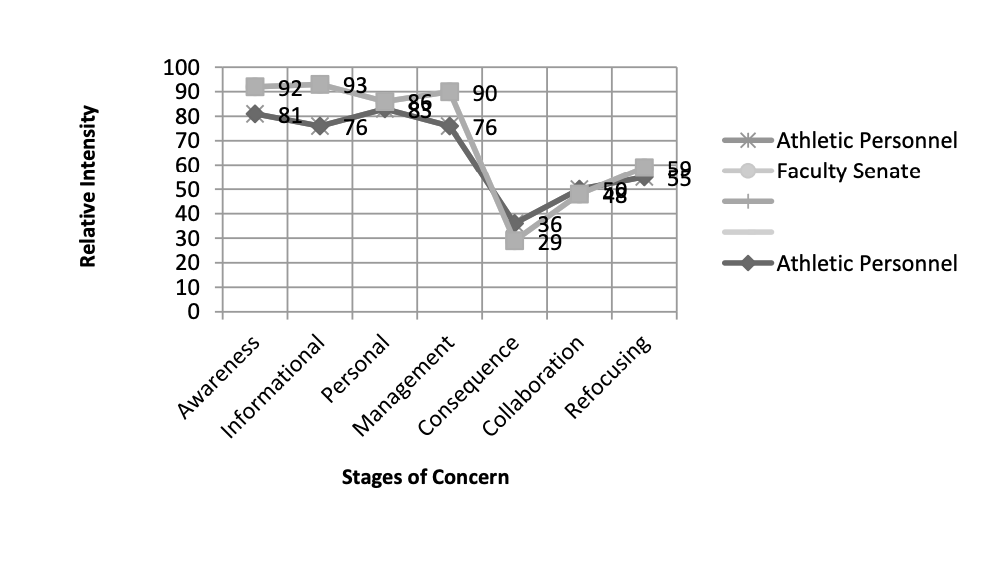
Figure 1
Webb University Faculty Athletic Representative Stages of Concern, Fall 2008 Through Spring 2009
Example of a figure with panels labeled:
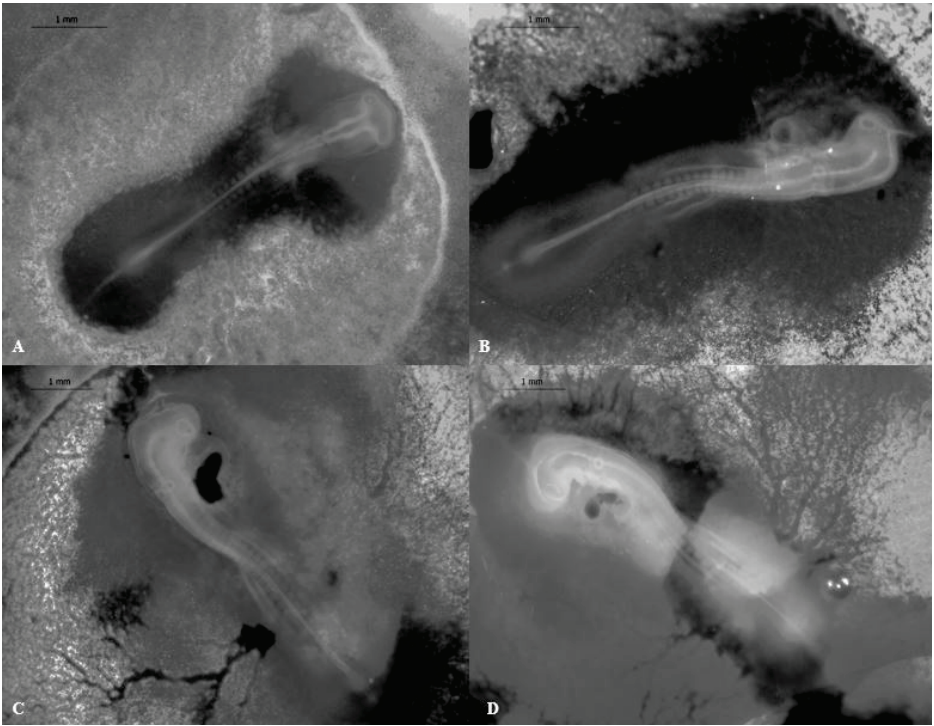
Figure 1. Stages 11–14 (52–60 h) of the California valley quail’s embryological development A) Stage 11, 13 somite pairs visible, B) Stage 12, 16 somite pairs visible. Telencephalon, optic vesicles, and auditory pit present, C) Stage 13, 19 somite pairs visible. Telencephalon and heart more prominent than previous stage, D) Stage 14, 22 somite pairs present. Optic lens, and Rathke's pouch can be identified.
Example of a labeled figure that is continued to another page:
Figure 8
Histogram of P and λ Vectors
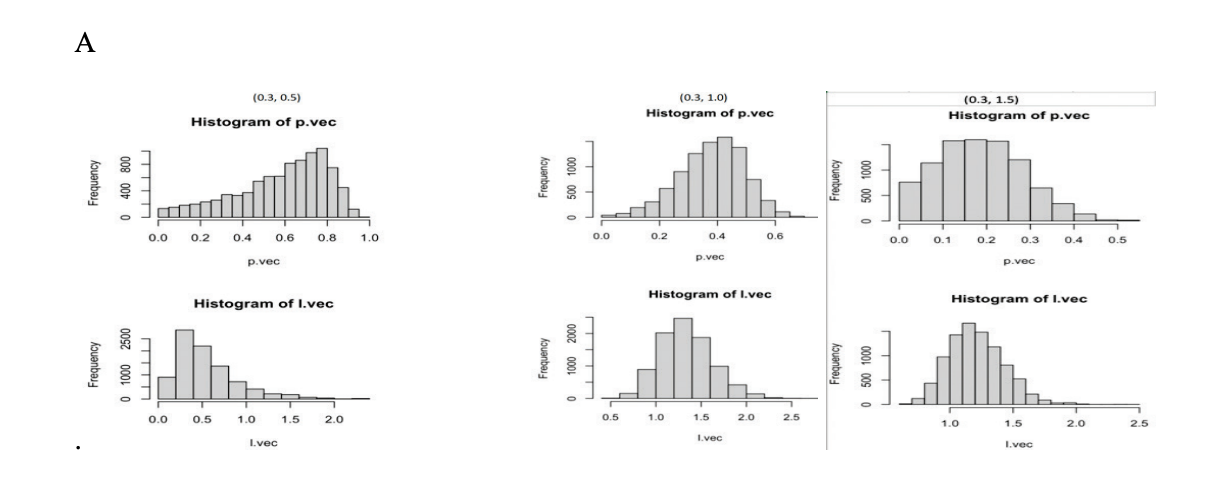
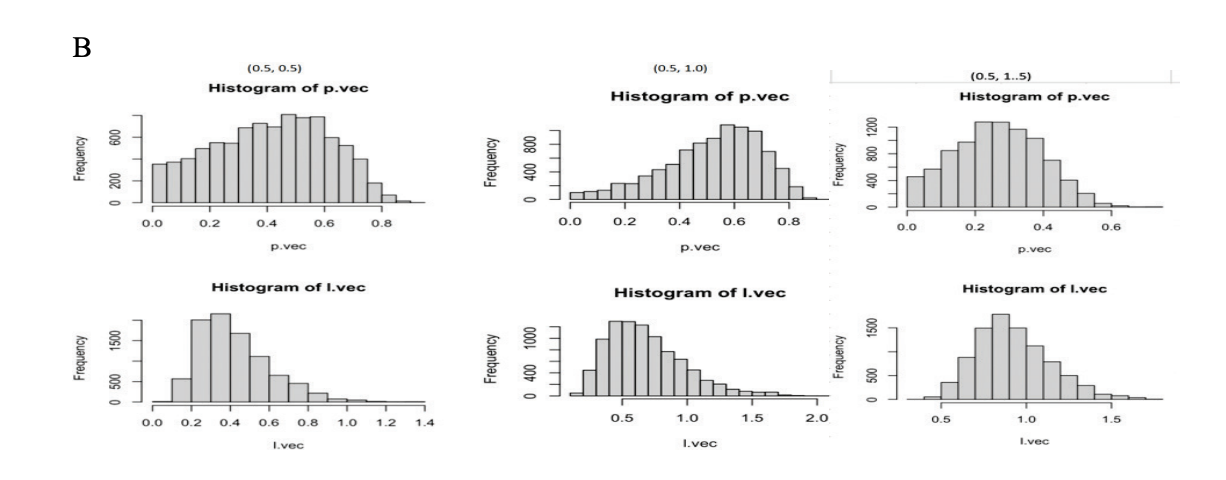
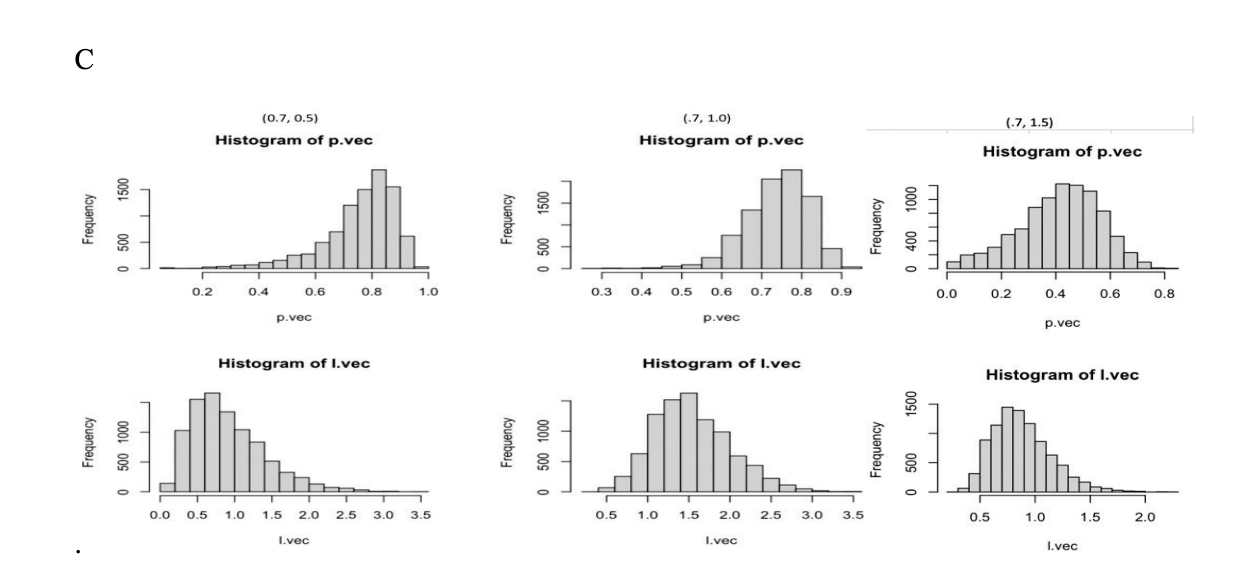
Note. A is a Histogram of P and λ Vectors Where p = 0.3 and λ = 0.5, B is a Histogram of P and λ Vectors Where p = 0.3 and λ = 1.0, and C is a Histogram of P and λ Vectors Where p = 0.3 and λ = 1.5.